Download DDU Free
Fix driver conflicts, stop stuttering, and ensure a clean install.

Complete & Clean Graphics Driver Removal

Display Driver Uninstaller (DDU) is a driver removal utility that helps you completely uninstall AMD, NVIDIA, and Intel graphics card drivers from your system without leaving leftovers behind.

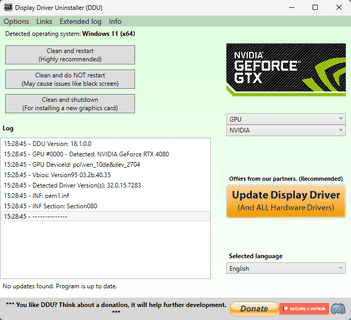
Display Driver Uninstaller system information overview

Download

Latest Version

Free download · Safe Mode Optimized · For Windows 10/11

Display Driver Uninstaller (DDU) is a driver removal utility that helps you completely uninstall AMD, NVIDIA, and Intel graphics card drivers from your system without leaving leftovers behind. Fix driver conflicts, stop stuttering, and ensure a clean install.

Features

Fix driver conflicts, stop stuttering, and ensure a clean install.

Total Leftover Removal:

  • Eradicates leftover registry keys, folders, files, and driver stores.
  • Ensures no traces of old drivers remain to cause conflicts with new installations.
  • Cleans up driver packages that standard uninstallers often miss.

Safe Mode Optimized:

  • Built to run perfectly in Windows Safe Mode for the most secure and thorough cleaning process.
  • Prevents interference from other running processes or services during removal.
  • Recommended for use when changing GPU brands or troubleshooting persistent issues.

Multi-Vendor Support:

  • Fully supports removing NVIDIA, AMD, and Intel GPU and Audio drivers.
  • Handles complex driver installations across different hardware vendors.
  • Suitable for users switching between AMD and NVIDIA cards.

Windows Update Blocker:

  • Prevents Windows from automatically downloading a standard driver while you are cleaning your system.
  • Ensures you can install the specific driver version you want without Windows interference.
  • Gives you full control over your driver installation process.

Technical registry and command examples

DDU cleans specific registry locations and can be run in Safe Mode. Advanced users often verify these locations or use commands to manage boot options.

Typical registry keys cleaned by DDU

HKEY_LOCAL_MACHINE\SOFTWARE\NVIDIA Corporation\Global
HKEY_LOCAL_MACHINE\SOFTWARE\AMD\CN
HKEY_LOCAL_MACHINE\SOFTWARE\Intel\Display
HKEY_LOCAL_MACHINE\SYSTEM\CurrentControlSet\Services\nvlddmkm
HKEY_LOCAL_MACHINE\SYSTEM\CurrentControlSet\Control\Class\{4d36e968-e325-11ce-bfc1-08002be10318}

Useful commands for Safe Mode

bcdedit /set {default} safeboot minimal
bcdedit /deletevalue {default} safeboot
shutdown /r /t 0
msconfig
sc query nvlddmkm

Use these commands and registry paths to verify the cleanup process or prepare your system for a safe DDU run.